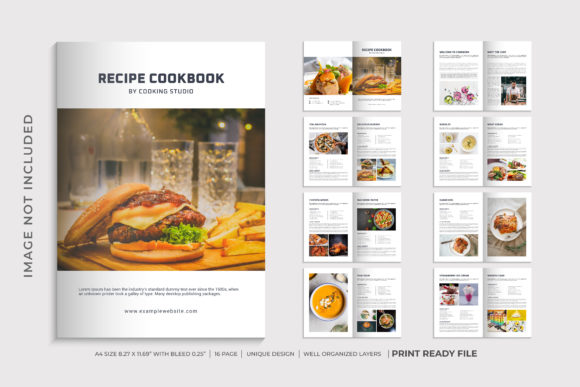
Evaluating the Recipe Cookbook Template for Professional Publishing Needs
When embarking on the journey of creating a culinary publication, whether it is a personal family archive, a small business menu, or a commercial cookbook, the foundation lies in the structural integrity and design flexibility of the source file. The Recipe Cookbook Template has emerged as a significant option for creators seeking a balance between aesthetic appeal and functional utility. Unlike generic document layouts that often struggle with image integration or text flow, this specific template is engineered to handle the unique demands of recipe formatting. It offers a structured approach that simplifies the complex process of organizing ingredients, instructions, and nutritional data into a cohesive narrative.
The distinctiveness of this tool lies in its adherence to professional standards while maintaining an accessible workflow. For designers and non-designers alike, the ability to produce high-quality results without extensive technical training is paramount. This template addresses that need by providing a robust framework that supports detailed content entry while ensuring visual consistency across all 16 custom pages. The decision to utilize this resource often comes down to understanding how its specific features align with the user's production goals compared to other available methods.
Structural Advantages and Design Flexibility
The core strength of the Recipe Cookbook Template is its A4 format size, measuring 8.27 x 11.69 inches. This dimension is not arbitrary; it represents the international standard for office and print paper, making it immediately recognizable and practical for most printing services. In the context of cookbook creation, this size allows for generous margins that accommodate photos and side notes without cluttering the main content area. It strikes a balance between the compactness of pocket-sized guides and the expansive layout of large-format art books.
A critical component of any printable document is the bleed. This template includes a precise 0.25 bleed specification. In professional printing, bleed refers to the area beyond the trim edge of the page that ensures no white borders appear after cutting. Many amateur templates omit this feature or apply it inconsistently, leading to unsightly gaps or cut-off images. By integrating a 0.25 bleed from the outset, this template ensures that full-bleed photography—a staple of modern cookbooks—is rendered correctly during the trimming process. This detail is often the difference between a DIY project that looks homemade and one that appears professionally published.
Furthermore, the internal architecture of the file is built for efficiency. With 100 editable elements and well-organized layers, the template reduces the cognitive load required to modify content. Users can isolate specific components, such as ingredient lists or step-by-step instructions, without affecting the surrounding design. This layer management is particularly valuable when dealing with variations of recipes or seasonal updates. Compared to flat-file designs where every change requires manual repositioning, this layered approach significantly accelerates the editing timeline.
Comparative Analysis: Editability and Workflow
When evaluating the Recipe Cookbook Template against alternative resources, the ease of editing stands out as a primary differentiator. Many premium design assets require expensive software like Adobe InDesign or Illustrator, which present steep learning curves for users who may only possess basic graphic design skills. This template distinguishes itself by being very easy to edit, catering to a broader audience including home cooks, food bloggers, and small entrepreneurs.
The inclusion of only free fonts is another strategic choice that enhances accessibility. In the digital marketplace, many templates rely on proprietary typefaces that require licensing fees or specific software subscriptions to view and edit correctly. This limitation can create hidden costs and compatibility issues. By utilizing exclusively free fonts, the template ensures that the final output remains consistent regardless of the user's hardware or software configuration. This approach eliminates the risk of font substitution errors, which can ruin the visual hierarchy of a page if the correct typeface is missing.
| Feature | Standard Generic Templates | Recipe Cookbook Template |
|---|---|---|
| Format Size | Often US Letter (8.5x11) or A3 | A4 (8.27 x 11.69) |
| Font Requirements | May require paid licenses | Only Free fonts used |
| Layer Organization | Often flattened or grouped | Well-organized layers |
| Print Safety | Bleed often missing | 0.25 Bleed included |
This comparison highlights how the Recipe Cookbook Template prioritizes user experience and print readiness. While generic templates might offer more decorative flair, they often lack the technical precision required for professional output. The tradeoff here is clear: users opting for this template gain reliability and ease of use, potentially sacrificing some of the hyper-customizable but complex features found in high-end design suites.
Use Cases and Decision Factors
Understanding when to choose this specific template over other options requires an analysis of the intended output. The 16 custom pages design suggests a medium-length publication, ideal for a collection of curated recipes rather than a comprehensive volume containing hundreds of entries. This makes it particularly suitable for niche projects, such as a "Weeknight Dinners" guide, a holiday-themed booklet, or a portfolio piece for a culinary student.
For individuals comparing options, the AI EPS version availability is a significant factor. Vector-based formats allow for infinite scaling without loss of quality, which is essential for resizing graphics or preparing files for various print sizes. If a user intends to scale their design for larger posters or marketing materials, the AI EPS version provides the necessary flexibility. Conversely, if the project is strictly for digital distribution in PDF format, the vector capability might be less critical, though it still adds value for future-proofing the asset.
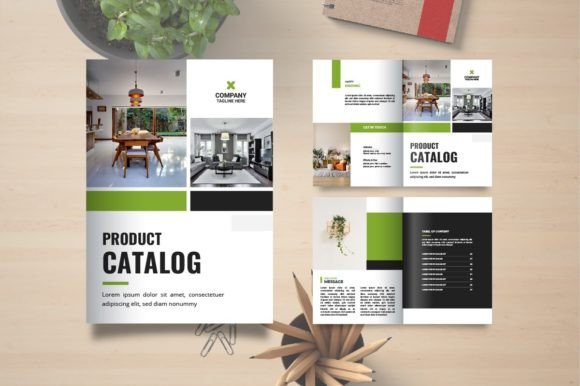
The Premium Quality Brochure Design aspect indicates that the aesthetic is tailored for high-impact presentation. This is beneficial for those looking to sell their work, whether as a physical book at a farmers market or as a digital download. However, for users whose primary goal is a simple, private family keepsake, the complexity of a premium brochure design might feel excessive. In such cases, a simpler, text-heavy document might suffice, rendering the advanced features of this template unnecessary.
Evaluating Alternatives and Limitations
No single solution fits every scenario. When exploring alternatives, readers might consider pre-made book publishing platforms or hiring a professional designer. Platforms offering drag-and-drop interfaces are often more intuitive but lack the granular control offered by a template file. They frequently lock users into specific page structures and limit the ability to move elements freely. The Recipe Cookbook Template occupies a middle ground, offering the freedom of a desktop application with the structure of a pre-designed layout.
However, there are limitations to consider. While the template is very easy to edit, it still requires familiarity with vector editing software to fully leverage the AI EPS capabilities. Users unfamiliar with these tools may find the layer organization overwhelming compared to a word processor interface. Additionally, the fixed nature of 16 pages means that projects requiring more extensive content will need to purchase additional extensions or create new documents, which can impact the overall cost and time investment.
Another consideration is the scope of customization. While the template is highly editable, it is not a blank canvas. Users must adhere to the established grid and style guides embedded within the design. For brands with strict identity guidelines that conflict with the template's aesthetic, this could pose a challenge. In contrast, starting from scratch offers unlimited creative freedom but demands significantly more time and expertise.
Final Considerations for Selection
Selecting the right resource for a cookbook project involves weighing the tradeoffs between speed, quality, and control. The Recipe Cookbook Template excels in scenarios where a professional look is desired quickly without compromising on print specifications. Its A4 format, combined with the 0.25 bleed and organized layers, ensures that the final product meets industry standards for physical reproduction.
For the target audience of adults aged 20–50 who are likely balancing multiple responsibilities, the time saved through well-organized layers and free font usage is a substantial benefit. It removes the friction associated with technical hurdles, allowing the creator to focus on the content—the recipes themselves. Whether the goal is to document family heritage, launch a small food business, or create a teaching aid, this template provides a reliable foundation.
Ultimately, the decision should be driven by the specific needs of the project. If the priority is rapid deployment with a polished appearance, this template is a strong candidate. If the project requires extreme customization or a non-standard page count, alternative approaches may be more appropriate. By carefully evaluating the strengths and limitations outlined above, creators can make an informed choice that aligns with their vision and resources.